For students, researchers & note-takers
Distil Complex PDFs & Books into Visual Knowledge Cards
Flowgraph is a PDF to visual card AI: hand it a paper, a textbook chapter or a book you have just finished, and it returns a knowledge card — the central idea in the middle, the supporting concepts arranged around it, the relationships drawn rather than described.
Before / after
The same content, twice
What you have
A dense chapter or paper
Spaced repetition and the forgetting curve
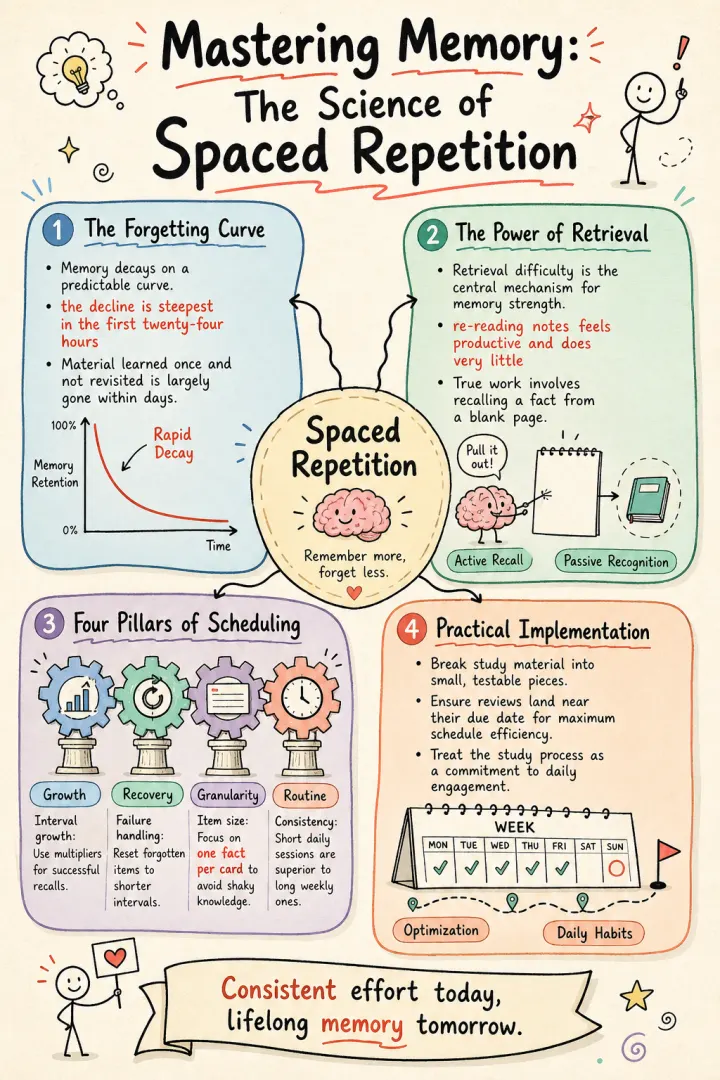
Memory decays on a predictable curve. Material learned once and never revisited is largely gone within days; the decline is steepest in the first twenty-four hours…
The central mechanism is retrieval difficulty. A review that is slightly hard strengthens the memory far more than one that is easy, which is why re-reading notes feels productive and does very little.
Four factors govern how well a schedule performs. Interval growth… Failure handling… Item size… And consistency…
What comes back
One portrait knowledge card
- The mechanism sits at the centre, not buried mid-paragraph
- Four labelled panels radiate from it — the curve, retrieval, the scheduling factors, and how to apply them
- Each panel keeps just enough text to be revised from
- The shape itself is the memory hook — one hub, four branches
Why highlighting doesn't stick
Highlighting feels like studying and behaves like reading. The passage gets marked, the page gets turned, and three weeks later the marks are still there but the argument is gone. The reason is well established: recognising something on a page is far easier than retrieving it from a blank one, so the study method that feels smooth is usually the one doing the least.
Making a real summary works, but it takes an hour per chapter — you have to identify the core claim, separate the supporting pillars from the examples, and work out how they connect. That is genuinely hard thinking, which is why it works and why it rarely survives a busy term.
A linear set of notes also loses the one thing a card keeps: shape. "Four factors hang off one mechanism" is a structure you can picture and recall. The same content as bullet points down a page is just a list, and a list is exactly what memory does worst with.
Reading a document for its skeleton
The useful part of a dense text is almost never distributed evenly. There is usually one mechanism doing the work, a handful of things that depend on it, and a large quantity of example, caveat and citation around the outside. A knowledge card is worth making precisely because it forces that separation.
Flowgraph does the separation as its first step. It reads the whole document, works out which claim is load-bearing and which material is support, then chooses a structure that matches: a hub with spokes when several factors hang off one idea, layers when the content is a hierarchy, a cycle when the last step feeds the first. The visual is a consequence of the argument's shape rather than a container it gets poured into.
Upload the file, not a copy-paste
Research does not arrive as clean text. It arrives as a PDF with two columns, running headers, footnotes and a page of references. Flowgraph parses PDFs, Word documents, Markdown and plain text in the browser, and lets you pick which page to work from — so a single chapter out of a 300-page book is a page selection rather than a copy-paste-and-clean exercise.
For long material, working page by page is usually better than feeding the whole file. One card per chapter or per section produces something you can actually revise from; one card for an entire book produces a table of contents with pictures.
- Journal papers and preprints
- A book summary to visual card, chapter by chapter
- Textbook and non-fiction chapters
- Lecture slides and handouts exported to PDF
- Your own reading notes, pasted as text
Cards built for revision, not decoration
A card that is beautiful and unreadable at a glance has failed at its only job. Whichever look you pick matters far less than restraint: each element should keep enough text to reconstruct the idea and no more, because a card dense enough to need real reading is a chapter again.
One idea per card is the rule worth following. If a chapter makes three independent arguments, three cards will serve you far better than one crowded diagram — the same reason a flashcard holding three facts fails as soon as any one of them is shaky.
How to do it in about a minute
- 01
Upload the PDF
Drop in the PDF, Word doc or Markdown file. Pick the page or paste just the section you want distilled.
- 02
Check the shape it came in with
The settings from this page are already applied: one idea at the centre with its supporting points around it, upright for a notebook or a wall.
- 03
Generate and file it
The card comes back in about a minute. Download the PNG into your notes app, or print it for a revision wall.
Questions
Questions about PDF to visual card AI
PDF, Word (.docx), Markdown and plain text, parsed in your browser. You can also paste raw text or hand over a URL. For a long PDF, pick a single page or section rather than feeding the whole file.
Up to 400,000 characters, which is longer than most books. That said, one card per chapter beats one card per book — a card covering too much stops being revisable.
It works from your text, but it is a generative model rendering a summary, so treat the card as a study aid rather than a citation. For anything you will be examined or quoted on, check the card against the source.
Yes — that is one of the most common uses. Paste your own notes or a summary of the chapters and you get a visual overview. There are worked examples in the knowledge-card templates.
Yes. Settle the look on the first card and reuse it for the whole module. Because it is a setting rather than something applied by hand, a term's worth of cards ends up looking like a set without any effort spent keeping them aligned.
Make a knowledge card
Paste your own text and the settings from this page are already applied. A free credit covers the first one.