Templates · How-to guides
Employee Onboarding Checklist Template
This employee onboarding checklist template lays the first ninety days out as five stages — before day one, day one, week one, day thirty, day ninety — so a manager can see what has to be ready before the new starter arrives rather than discovering it on the morning.
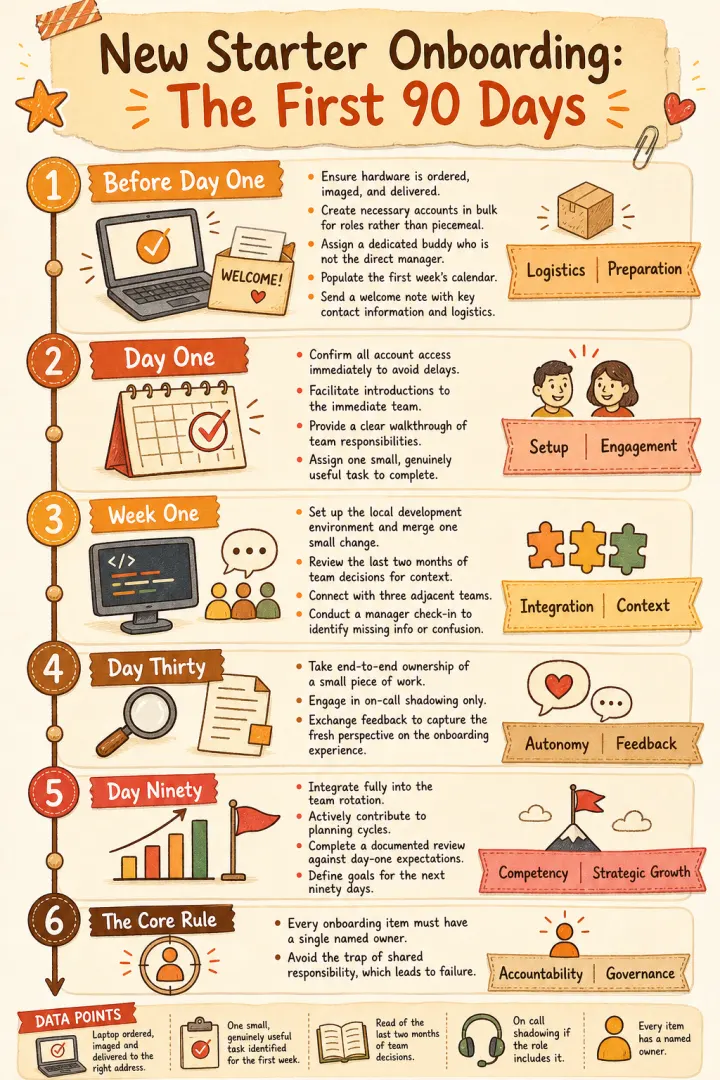
What this card carries
- A before-day-one stage, which is where onboarding is usually already lost
- Each stage carrying its own items rather than one flat list of thirty things
- The first real task named at week one, not a toy exercise
- A closing rule — every item has a named owner — because shared responsibility is how these fail
The written process this checklist was generated from
New starter onboarding — the first ninety days
Before day one. Laptop ordered, imaged and delivered to the right address. Accounts created for email, chat, the code host and the issue tracker, all in the groups the role needs rather than added one at a time later. A buddy assigned who is not the manager. The first week's calendar already populated. A welcome note sent with the start time, the location or the call link, and who to contact if anything goes wrong.
Day one. Access confirmed working before anything else, because a first day spent waiting on a password reset sets a tone that is hard to undo. Introductions to the immediate team. A walkthrough of what the team is responsible for and what it is not. One small, genuinely useful task identified for the first week — not a toy exercise.
Week one. The development environment running locally and a change made, reviewed and merged, however trivial. A read of the last two months of team decisions, so the new starter understands the state of things rather than only the plan. One conversation with each of the three teams closest to this one. First check-in with the manager at the end of the week: what was confusing, what was missing.
Day thirty. Owning a small piece of work end to end. On call shadowing if the role includes it, never on call alone. Feedback in both directions — the new starter's view of onboarding is most accurate now and gone by month three.
Day ninety. Fully in the rotation. Contributing to planning rather than receiving it. A documented review against the expectations set on day one, and a specific answer to what the next ninety days are for.
The one rule. Every item has a named owner. Onboarding fails as a shared responsibility.
Why the first stage is the one that decides everything
The items that ruin a first day are all completed before it: the laptop, the accounts, the group memberships, the calendar. None is difficult and each has a lead time, which is why a new starter spends their first morning waiting on a password reset while their manager is in a meeting.
Drawing the process as stages makes that lead time visible. A flat checklist implies everything can be done on the day; a staged one shows that a third of the work is due before the person exists in your systems — and it is the version you can hand to whoever is preparing for the next hire.
Adapting this employee onboarding checklist template to your own process
Paste the onboarding process you already have, however it is written — a wiki page, an email to yourself, the notes from the last time. The stages come from your text, so a role with a security clearance stage or a customer-facing shadowing period gets one.
The one thing worth adding before you generate is the exit condition for each stage: what has to be true before this part is finished. Most written onboarding processes list tasks and omit that, which is precisely why nobody can tell whether onboarding is going well until it has already gone badly.
Questions
Questions about this how-to guide template
Yes, and that is the usual pattern. Generate the shared version once, then paste the role-specific process for each variant. Keeping the same look across them means a new starter recognises the format even when the content differs.
Both, and the same image works for each. The manager reads it as a preparation list, the new starter reads it as a map of what the first three months are supposed to look like — which is information most new starters never get in any form.
Yes. Downloads are full-resolution PNGs with no watermark, so it prints at A4 or drops into a handbook page. Upright suits both.
No — this is not a blank template you fill in, and the result is not an editable canvas. You paste the text you have already written, and Flowgraph renders it as a finished PNG. If something is wrong, change the source text or switch the style and generate again; each generation costs one credit.
More How-to guides
Use this template with your own text
Not a blank template to fill in: you bring the writing, and this template's structure, style, aspect and palette are applied to it. What comes back is a finished image, not an editable canvas. One credit per image, and the first is free.